

New
Tune your feed from one panel
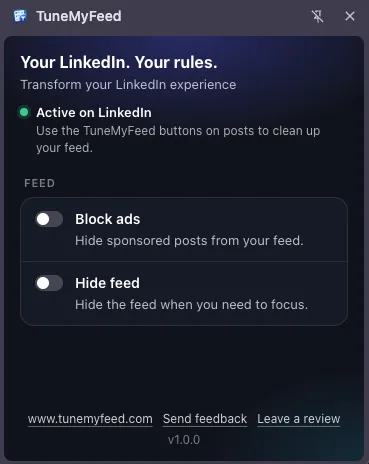
Click the TuneMyFeed icon in your browser's toolbar and a side panel opens next to LinkedIn. It holds your settings, and tells you whether TuneMyFeed is active on the LinkedIn tab you're looking at.
Read more →Open LinkedIn without getting pulled into the feed
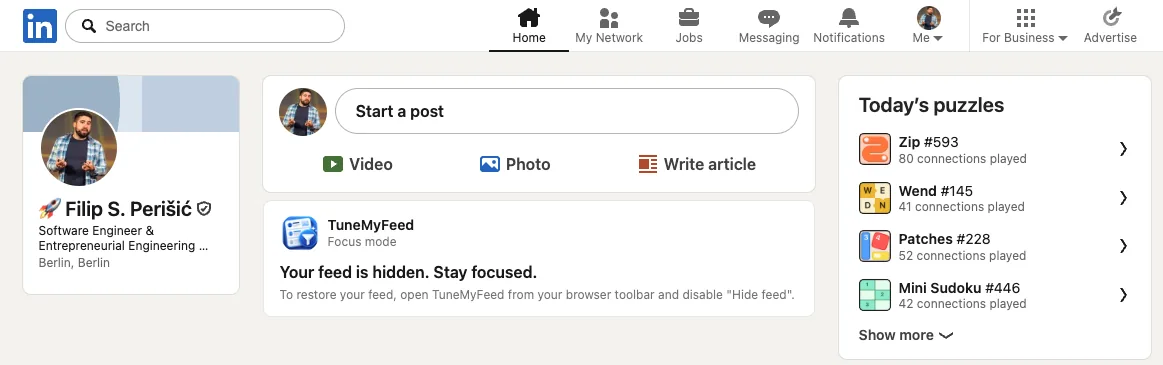
One switch replaces the LinkedIn feed with a calm TuneMyFeed card. Open LinkedIn for messages, a profile or a job post without getting pulled into scrolling. "Start a post" stays, so you can still share.
Read more →Scroll LinkedIn without the ads
Turn on "Block ads" and promoted posts disappear from your feed, without leaving a gap. Prefer to decide ad by ad? The "Hide ad" button is still on every promoted post.
Read more →Improved
Start using it without reloading LinkedIn
After you install or update TuneMyFeed, LinkedIn tabs that are already open pick it up without a reload, and your settings apply before the page shows.
A calmer toolbar icon, no counters
The toolbar icon no longer shows a post count or an orange badge. Just the icon.